

6 South Korea Travel Apps: Best Picks for a Stress-Free Trip
Planning a trip to South Korea? These 6 South Korea Travel Apps can make everyday travel much easier, from finding your way around Seoul to booking trains and translating Korean. But for South Korea travel apps, you won’t just find them convenient; these are the only tools that will provide you with true turn-by-turn navigation services, order food, call a cab, and book a KTX train ticket. And all of that because of an outdated national security law that prevents Google Maps from providing walking/driving directions and accurate subway/transit information in South Korea.
Thus, before even packing a bag, you need new tools. This guide breaks down the six essential Korean apps every foreign traveler should install, why Google Maps alternative South Korea searches spike every year, and how to build a smooth travel checklist for your trip.
Why Does Google Maps Not Work in South Korea?

The Reason behind this Blockage is Korea’s National Security Law
South Korea views the 1:5,000 scale map data as an asset of national security and since the mid-2000s, government has been refusing Google’s multiple attempts to export the map data outside Korea.Moreover, without that data stored locally, Google Maps in South Korea cannot calculate walking, driving, or cycling routes — it can only show static pins.
What Actually Breaks When You Rely on It
- No turn-by-turn walking or driving directions
- Inaccurate or missing public transit routes
- Outdated business listings and closed storefronts
- No real-time traffic or subway delay data
Why This Matters More in 2026
South Korea welcomed a record number of international visitors this year, and many arrive assuming their home navigation app will simply work the way it does in Tokyo, Bangkok, or Paris. Moreover, Seoul’s subway system alone has over 20 lines and hundreds of exits, so a single wrong turn can add 15–20 minutes to your commute. Therefore, understanding this quirk before landing — rather than discovering it jet-lagged at Incheon Airport — saves both time and frustration.
Is This Changing in 2026?
Here’s some good news: pressure from trade negotiations has pushed the conversation forward. According to reporting on the issue, the Korean government moved toward conditional approval of Google’s map data export request in early 2026, after the U.S. government flagged the restriction as a nontariff trade barrier. However, nothing has fully rolled out yet, so travelers still need local alternatives for 2026 trips.
What Are the Best Google Maps Alternatives for South Korea Travel?
Naver Map: The Foreigner-Friendly Default

Naver Map is widely considered the single best Google Maps alternative South Korea has to offer.It translates to English, Chinese, and Japanese and provides review translation via Papago powered AI and offers walking, driving, subway, and bus directions with real-time data accuracy.
Based on a survey done jointly by Korea’s Ministry of Culture, Sports and Tourism, and the Korea Tourism Organization, 56.2 percent of foreigners who visited Korea used Naver Map, while only 33.9 percent used Google Maps, clearly an indication of which application works better in practice.
KakaoMap: The Local App for Exact Directions

The app that Koreans use the most is KakaoMap and it works great with Kakao T for taxi services. It is not as good as Naver Map in terms of English but its directions for walking and subway exit numbers are very accurate indeed.
Choosing Between the Two
Research shows most travelers end up keeping both. Naver Map for restaurant discovery and reviews, KakaoMap for raw navigation accuracy. Both apps are a little different. They don’t replace each other.That’s a feature, not a defect.
Korean Apps to Break the Language Barrier?
Papago: Your Real-Time Translator
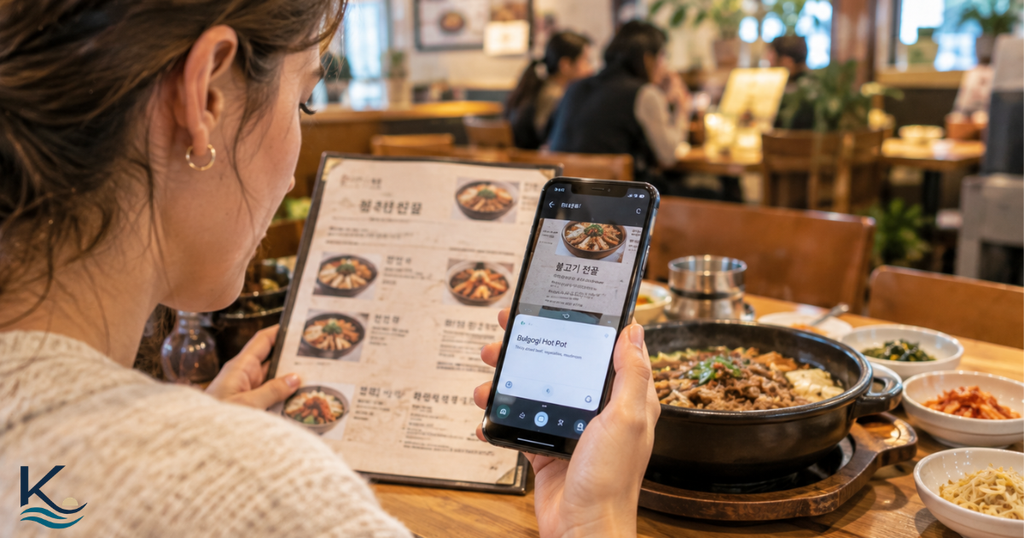
Papago, developed by Naver, is the Korean apps category’s most essential download for anyone who doesn’t speak Korean. It handles text, voice, and camera translation — point your phone at a menu or a subway sign and get an instant English reading.
Why Papago Beats Generic Translation Apps in Korea
Trained specifically on Korean sentence structure and honorifics
Integrated directly into Naver Map’s review translations
Offline mode available for subway dead zones
Handles menu photo translation better than most general-purpose apps
The use of it in daily practice by travelers
Ordering in restaurants without English menus
Reading medicine labels at pharmacies
Translating text messages from Korean hosts or hotels
Communicating basic directions with taxi drivers
How Do You Get Around Without a Korean Driver’s License?
Kakao T, South Korea’s Uber Rival

Kakao T is South Korea’s top ride-hailing app and unlike some competitors, it now accepts international credit cards and offers booking in English. Therefore, it’s an easy first download alongside KakaoMap.
Book a Taxi Process by Process
Pin down your pickup point through GPS or Naver Map/Kakao Map address paste
Select between standard, deluxe (black cab), or Kakao T Blue
Directly pay in-app through foreign card and avoid paying in cash
Follow your taxi in real time, just as you do for Uber and Lyft
When Should You Use Kakao T Instead of Public Transport?
Use Kakao T when it’s late at night, raining, or carrying lots of baggage. However, when it is peak hour in Seoul, taking the subway will be significantly faster and cheaper — one trip typically costing under $1.50 USD.
What’s the easiest way to reserve train tickets in South Korea?
Korail+: Reserving KTX without Resident Registration Number
Korail+, the successor of KorailTalk mobile application (2026), is the only official website used to make reservations for fast trains of South Korea (KTX) and regular trains. Foreigners are able to register by providing a passport number and e-mail.
SRT: The Other High-Speed Alternative
Unlike KTX, most SRT trains depart from Suseo Station rather than Seoul Station. The ticket booking process is expected to be streamlined later in 2026 with the merger of Korail and SR Corporation reservation services.
Booking KTX in Advance Tips
Book in advance (at least 3-5 days before departure) during national holidays such as Chuseok and Lunar New Year
Consider Korail Pass if planning 3 or more long distance trips
Store your ticket QR code offline in case of lack of internet connection
Arrive at station 15 minutes earlier – Korean trains leave punctually
Booking Restaurants and Reservations in Korea
CatchTable Global: Reservations without a South Korean phone number

CatchTable Global is the overseas version of Korea’s most used restaurant booking app. Some of Seoul’s most sought-after restaurants – particularly the trending places around Seongsu and Hongdae – can only make reservations via this application and do not take walk-ins.
The Reason Why You Should Make Reservations
Trending restaurants fill up all of their reservations weeks in advance
Walk-in wait times range from 90 to over 120 minutes in some places
Some of the restaurants provide English menus only when using this application
CatchTable Global accepts foreign credit cards for those bookings that require a deposit
Preparation for Your Trip
Get an account on CatchTable Global and check out some selected restaurants before your trip to Korea. That one action will have more impact on your travel than any other since food plays such a central role in any Korean vacation. In addition, most CatchTable Global restaurants have pictures and translations of the menu provided by users.
6 South Korea Travel Apps You Should Download Before Your Trip
| No | Checklist Item | What to Do |
|---|---|---|
| 1 | Prepare Your Travel Documents | • Passport valid for 6+ months• Visa (if required)• Travel insurance• Printed copies (optional) |
| 2 | Set Up Your Connectivity | • Get a local SIM or eSIM or portable Wi-Fi device• Install essential apps (maps, translation, etc.)• Make sure your phone is unlocked |
| 3 | Plan Your Transportation | • Download navigation apps (Naver Map / KakaoMap)• Book KTX train tickets• Set up a transportation card (T-money / cash card) |
| 4 | Reserve Your Accommodation | • Confirm your hotel booking• Check check-in details• Save the hotel address and contact number |
| 5 | Make Restaurant Reservations | • Book popular restaurants (especially in busy areas)• Check wait times & menus• Confirm overseas card support |
| 6 | Explore & Get Ready to Go | • Save offline maps & key info• Keep a list of must-visit places• Learn basic Korean phrases• Pack essentials & enjoy your trip! |
Frequent Ask Questions : 6 South Korea Travel Apps
Q:Is Google Maps functional in South Korea?
ANS:Google Maps will help you find the top places to visit in South Korea but will not help you navigate via walking, driving, or even public transport due to data export restrictions in South Korea. It is only useful for general orientation.
Q:What is the best Google Maps alternative in South Korea?
ANS:Naver Map is usually regarded as the best one to use, owing to full English-language support and built-in Papago translation feature. KakaoMap serves as a nice alternative, especially when it comes to subway exit instructions.
Q: Do I need a Korean number to access these apps?
ANS: While a number of these apps including Naver Map, KakaoMap, and Papago do not require a Korean mobile number, some apps such as Kakao T and Korail+ will normally require an email ID and a passport number in place of a Korean mobile number.
Q: Can I purchase tickets for KTX trains besides train stations?
ANS: Yes. The Korail + app enables tourists to buy train tickets without visiting any train stations.
Q: What are the best 6 South Korea Travel Apps for first-time visitors?
ANS: The 6 South Korea Travel Apps covered in this guide are useful for navigation, communication, taxis, trains, and finding places to eat.
Planning more than just the practical side of your trip? Visit K Beach Life for more guides to South Korea’s beaches, coastal destinations, food, and places worth adding to your itinerary.
Final Thoughts: Don’t Land in Korea Unprepared
The Republic of South Korea ranks high among the places that will offer you great rewards, but first, you need the right tools to make it all happen. But if you are traveling to South Korea using only Google Maps, it would be quite easy for you to get lost or pay more than you should in terms of taxi rides. Install Naver Map, KakaoMap, Papago, Kakao T, Korail+, and CatchTable Global before you travel.
Ready to finish your prep? Save this checklist, share it with your travel group, and start setting up your accounts today — future you, standing confused on a Seoul subway platform, will thank you.


Step by step all detail available for any visitor🤩very informative
Good effort
Lot of appreciation 🥰
Thank you so much for your kind words! 🥰 I’m really glad you found the guide informative and easy to follow. Your appreciation means a lot, and I hope it helps make your South Korea trip a little easier and more enjoyable.